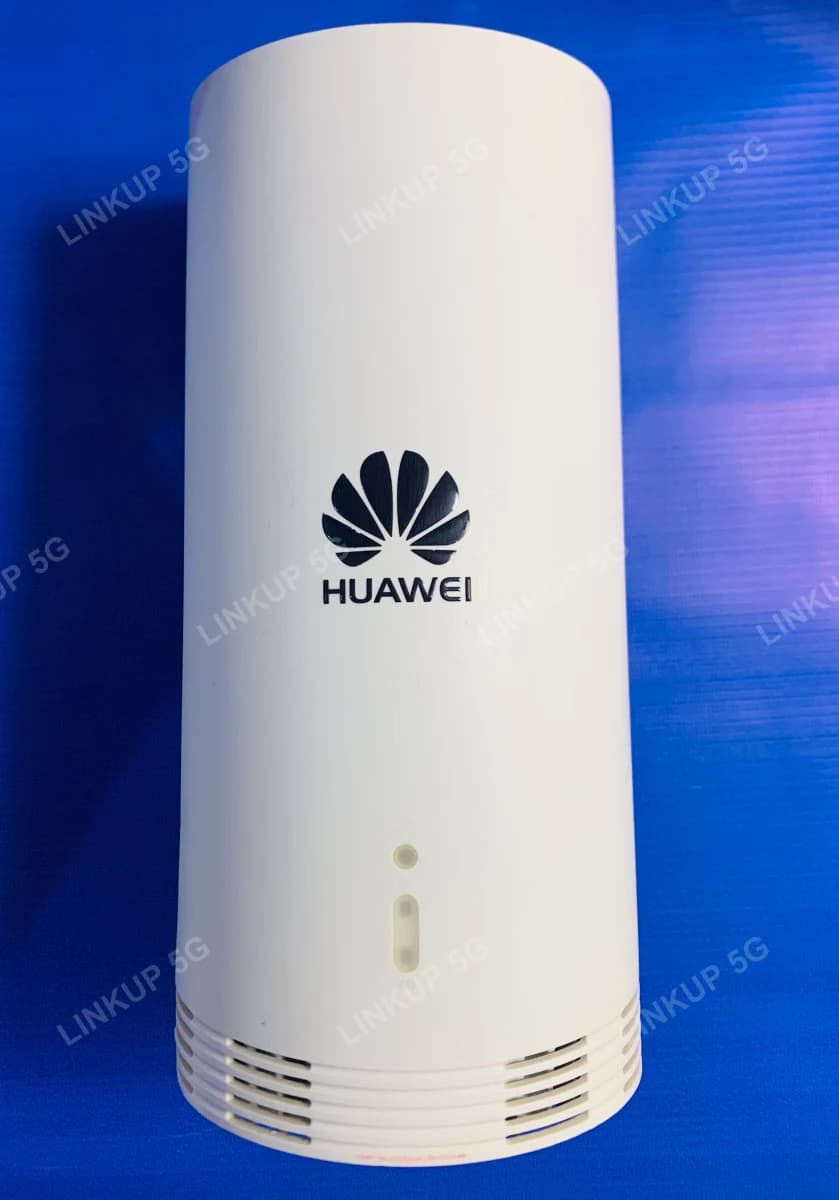
Huawei N5368X Indoor/Outdoor 5G CPE Router
One router, two setups: plug-and-play indoor WiFi, or mount it outside for the strongest possible signal.
The N5368X noticeably speeds up a SIM's internet and is one of the best devices in the catalog for low or weak-signal areas. It's a 5G router that turns a SIM card into fast Wi-Fi 6 internet, built to handle the one problem most routers can't: weak indoor signal. Instead of being locked into one placement, it works two ways. Placed indoors, it's a capable 5G router in its own right, supporting up to 32 devices over dual-band Wi-Fi 6. Mounted outdoors, it becomes something most routers simply can't do: it catches a meaningfully stronger signal on a wall or pole, then feeds that connection to a separate WiFi extender indoors so the whole building gets strong WiFi, even in a spot no indoor router could ever reach. Both setups run on the same PTA-approved, factory-unlocked unit, compatible with any Pakistani SIM. This unit is a genuine Huawei N5368X, quality-checked and in like-new condition, which is part of why it's priced the way it is.
+ PKR 250 delivery charge, nationwide
Cash on Delivery
Best Quality
Genuine Products
Huawei N5368X Indoor/Outdoor 5G CPE Router
PKR 25,000
Weak indoor signal has two different fixes, and this router covers both
If your indoor signal is just inconsistent, plug the N5368X in indoors like a normal router and it broadcasts its own WiFi 6 network immediately. If the signal is weak everywhere inside but usable outside, or there's no fiber, cable, or DSL available at all, mount it outside instead: its PoE adapter lets you run an Ethernet cable from the router to a separate WiFi extender indoors, so the extender broadcasts WiFi using the stronger signal the router caught outside. It won't create signal where none exists at all, but between the two setups it covers both the common weak-indoor-signal case and the no-fixed-line case.
Best For
- Homes or offices where fiber, cable, or DSL isn't available
- Addresses with usable signal outdoors but weak signal indoors, using the outdoor mount + extender setup
- Anyone who just wants a simple SIM router with strong indoor WiFi 6, using the indoor plug-and-play setup
- Rural or semi-urban locations within range of a 4G or 5G tower
Not Ideal For
- Locations with no cellular signal nearby at all, since outdoor mounting extends range but can't create signal that isn't there
- Anyone needing landline-style voice calling from the router, since it is data-only with no VoLTE
- The outdoor + extender setup, if you don't already have or want to buy a separate WiFi extender, since LinkUp sells the router and PoE only, not a bundled extender
- Buyers who want to attach their own external antenna, since the antennas are internal and fixed
- Buyers who specifically need a factory-sealed, never-opened retail box
Specifications
- Works indoors as a plug-and-play SIM router, or outdoors mounted for stronger signal
- PoE adapter carries power and data to the router over one cable
- PoE adapter's second slot feeds a separate WiFi extender indoors, for the outdoor setup
- 5G NR Sub-6GHz with 4G LTE Cat19 fallback
- Dual-band Wi-Fi 6 (2.4GHz + 5GHz)
- IP65 weatherproof outdoor rating
- Wall or pole mounting bracket included
- Supports up to 32 connected devices
- Factory unlocked, works with any Pakistani SIM
- PTA type-approved, no separate registration needed
- Manage via web dashboard or Huawei SmartHome app
- WPA3 wireless security
- Network Support
- 5G NR (Sub-6GHz) with 4G LTE Cat19 / 3G fallback
- 5G Bands
- n41 / n77 / n78
- Max 5G Speed (NSA)
- Up to 1.5 Gbps down / 110 Mbps up*
- Max 5G Speed (SA)
- Up to 1.5 Gbps down / 220 Mbps up*
- Max 4G LTE Speed
- Up to 1.6 Gbps down / 150 Mbps up (Cat19)*
- WiFi Standard
- Wi-Fi 6 (802.11ax), dual-band
- Max Connected Devices
- 32 (2.4GHz + 5GHz combined)
- SIM Slot
- 1x Nano SIM (4FF)
- Router Port
- 1x port for the single PoE cable (carries both power and data, no separate power jack on the router itself)
- PoE Adapter
- Included; sits indoors with 2 slots — 1 for the power adapter, 1 for an Ethernet cable out to a WiFi extender
- Security
- WPA3, MAC filtering, firewall, VPN passthrough
- Weatherproofing
- IP65 (outdoor rated)
- Mounting
- Wall or pole bracket (included)
- Dimensions
- Approx. 225 x 100 x 32 mm
- Management
- Web UI (192.168.8.1) or Huawei SmartHome app (iOS/Android)
Speeds marked * are Huawei's manufacturer-rated maximums under ideal lab conditions, not an independent test result; real-world speed depends on distance from the tower, network congestion, and local coverage. The PoE adapter's Ethernet slot is only used in the outdoor + extender setup; a WiFi extender is not included and is bought separately.
Network Compatibility
Runs on 5G where Jazz or Zong 5G coverage reaches (live in Islamabad, Lahore, Karachi, and other major cities as of 2026); falls back to 4G LTE elsewhere, including on Ufone and Telenor SIMs, whose 5G networks have not yet launched. PTA type-approved, so it works immediately on any network without a separate import registration.
Setup Guide
Before you start (both setups)
- 1
Insert your Nano SIM card into the slot on the back of the unit.
- 2
Connect the router to the PoE adapter using the included cable, then plug the PoE adapter into a power socket.
Indoor setup
- 1
Place the router indoors like a normal SIM router, on a shelf or desk near where you need WiFi. No mounting needed.
- 2
It broadcasts its own WiFi 6 network as soon as it powers on.
- 3
Connect to the WiFi name printed on the router's label, or visit 192.168.8.1 to open the setup dashboard and set a new WiFi password.
Outdoor setup (with a separate WiFi extender)
- 1
Mount the router outside with the included wall or pole bracket, facing roughly toward the nearest signal tower.
- 2
Run an Ethernet cable from the PoE adapter's second slot to a separate WiFi extender placed indoors.
- 3
The extender broadcasts WiFi indoors using the stronger signal the router caught outside.
- 4
Connect to the WiFi name printed on the extender's label, or visit its setup page to set a new WiFi password. Check the signal bars in the router's own dashboard (192.168.8.1) and reposition the outdoor mount if they're low.
Questions About This 5G Outdoor CPE
Yes. It is factory unlocked and PTA approved, so it works with Jazz, Zong, Ufone, and Telenor SIMs. Jazz and Zong currently run 5G in major cities, so those SIMs get the fastest speeds; Ufone and Telenor SIMs run on 4G LTE until their 5G networks launch.