Pospro DT-150LP 4" Direct Thermal Label Printer (USB, Bluetooth, WiFi, LAN)
A 4-inch direct thermal label printer for shops and warehouses, connects over USB, Bluetooth, WiFi, or LAN, no ink, ribbon, or toner needed.
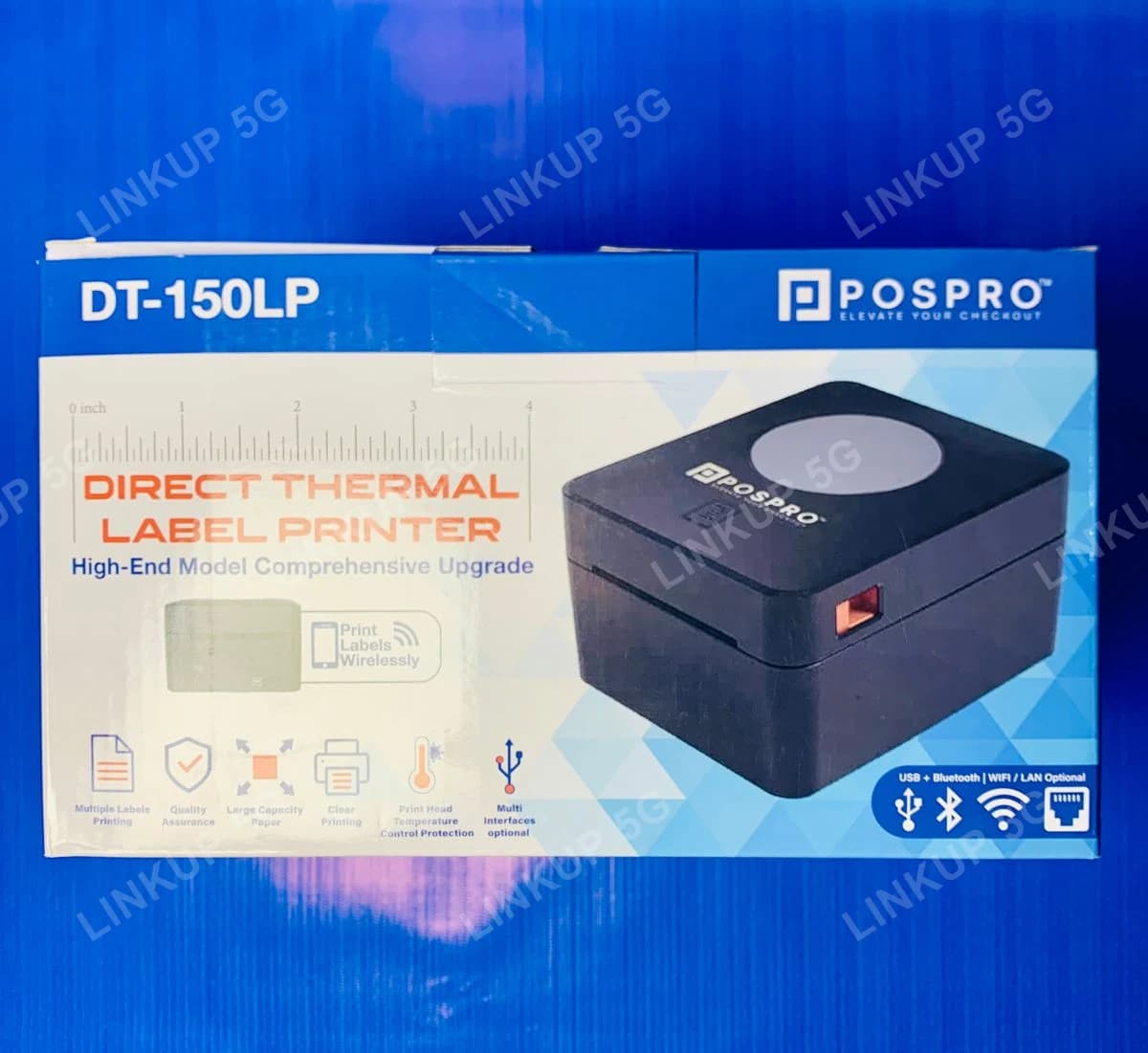
This is a 4-inch direct thermal label printer built for printing barcode labels, price tags, shipping labels, and similar tagged items in a shop, warehouse, or small business. It uses direct thermal printing, the same ink-free technology as a receipt printer, so there is no ink, ribbon, or toner to buy or replace; the image is printed directly onto heat-sensitive label paper. It connects over USB for a fixed desktop setup, Bluetooth for a printer that needs to move around a counter or stockroom, or WiFi/LAN for a shared network printer multiple computers can print to, and prints at up to 160mm/s. It accepts several label paper types (continuous rolls, die-cut labels, fanfold, and tag stock), so it covers most common labeling jobs rather than one fixed label size. It is a dedicated label printer, not a general-purpose document printer or a receipt printer: it prints on label/tag stock up to 104mm wide, not plain A4 paper, and it is a separate product from a counter receipt printer.
+ PKR 250 delivery charge, nationwide
Cash on Delivery
Best Quality
Genuine Products
Pospro DT-150LP 4" Direct Thermal Label Printer (USB, Bluetooth, WiFi, LAN)
PKR 14,000
A shop or warehouse that needs printed barcode labels and tags
Pricing items, labeling inventory, or printing shipping labels by hand is slow and inconsistent, and a general office printer cannot print on label or tag stock cleanly. The DT-150LP prints barcode labels, price tags, and shipping labels directly from label design or inventory software at up to 160mm/s, with no ink or ribbon to run out of mid-batch, and connects over USB, Bluetooth, WiFi, or LAN depending on whether the printer stays at one desk, moves around the shop, or needs to be shared over the network.
Best For
- Shops and retailers printing price tags and barcode labels
- Warehouses and small businesses labeling inventory
- Printing shipping or courier labels for online orders
- Setups that want USB for a fixed desktop printer, Bluetooth for a portable one, or WiFi/LAN for a shared network printer
Not Ideal For
- Printing plain A4 documents, since this only prints on label, tag, or continuous roll stock
- Printing shop receipts or bills, since that is a separate product (see the Speed-X SP-90A receipt printer)
- Color label printing, since direct thermal printing is black only
- Buyers who specifically need a stated manufacturer warranty term, since none is confirmed here
Specifications
- Direct thermal line printing, no ink, ribbon, or toner required
- Print speed up to 160mm/s
- 203 DPI resolution (8 dots/mm)
- Connects over USB, Bluetooth, WiFi, or LAN
- Prints up to 104mm (4.0") wide label, tag, or continuous roll stock
- Accepts continuous paper, die-cut labels, fanfold, and tag paper
- Print head rated for 50km / 100,000,000 pulses per dot
- Includes power adapter, USB cable, roll-mounting bar, and 2 core adapters for different paper roll sizes
- Printer Type
- Direct thermal line printer
- Print Speed
- Up to 160mm/s (Max)
- Resolution
- 203 DPI (8 dots/mm)
- Connectivity
- USB, Bluetooth, WiFi, LAN
- In the Box
- Printer, power adapter, USB cable, roll-mounting bar, 2 core adapters
- Effective Print Width
- 100mm (max 800 dots)
- Maximum Paper Width
- 104mm / 4.0 inches
- Paper Thickness
- 0.06mm - 0.30mm
- Supported Paper Types
- Continuous paper, die-cut labels, fanfold paper, tag paper
- Print Head (TPH) Life
- 50km / 100,000,000 pulses per dot
- Power
- DC 24V / 2.5A
Connectivity (USB, Bluetooth, WiFi, LAN) is confirmed directly from LinkUp's own unit: the retail box's connectivity icons and the printer's own built-in self-test printout. Other specifications (print speed, resolution, paper width, print head life, power) are confirmed from the manufacturer's listed spec sheet via an authorized Pakistani reseller, not an independent LinkUp test. Operating temperature, weight, dimensions, and label sensor type are not stated here because no verified source for this exact model listed them; confirm these details with LinkUp before ordering if they are critical for your setup. No warranty term is stated for this product.
Setup Guide
- 1
Load a roll of label, tag, or continuous paper into the printer according to the feed guide inside the paper compartment.
- 2
Connect the power adapter and turn the printer on.
- 3
For USB: connect the USB cable to your computer and install the printer in your label or inventory software.
- 4
For Bluetooth: put the printer in pairing mode and pair it from your phone, tablet, or computer's Bluetooth settings.
- 5
For WiFi or LAN: connect it to your shop network through its setup menu or utility (WiFi) or an Ethernet cable (LAN), then add it in your label software by its network address.
- 6
Print a test label to confirm alignment and paper feed before running a full batch.
Questions About This Printers
No. It uses direct thermal printing, which prints by heating the label paper itself, so there is no ink, ribbon, or toner to buy or replace.